Understanding Variables and Data Types in JavaScript

Imagine you are moving into a new house You have a lot of stuff—books, clothes, kitchen gadgets. To keep things organized, you put them in boxes and put a label on each box. So in programming the box holds the information(data) , the label is the name we give it to find it later and finally the stuff present inside it is the value.
How to Build Your Box (Declaration of a Variable)
In JavaScript, we don't just grab a box; we have to tell the computer what kind of box it is. We do this using three special words: const, let, and var.
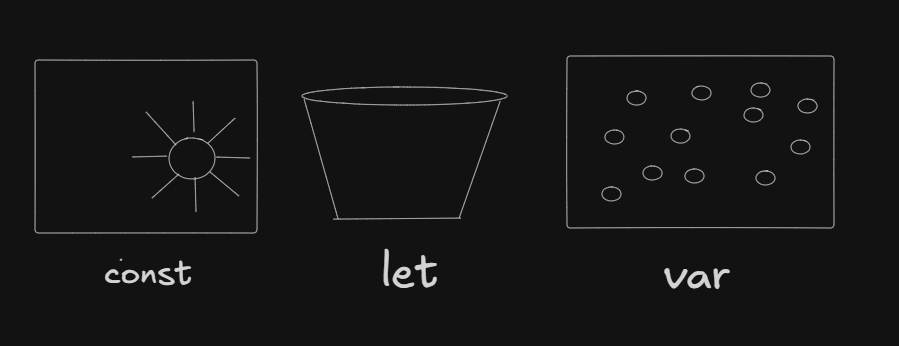
const(The Vault): Use this for things that never change. Once you put something in, it’s locked!
const birthday = "Jan 1st";
let(The Tupperware): Use this for things that will change. You can take the stuff out and put new stuff in.
let score = 0;
var(The Antique): This is the old way of doing things. It’s a bit "leaky," so most modern coders avoid it, but you’ll still see it in old books.
var setLoading = false;
What are data types?
Remember the "stuff" we put in the boxes? In programming, "stuff" comes in different flavors called Data Types. In your moving boxes, "stuff" generally falls into two categories based on how it fits inside.
1. Primary (Primitive) Types: The Single Items
These are like a single book or a specific kitchen utensil. They are simple, lightweight, and the box holds the actual item.
Strings: Text like
"Books".Numbers: Counts like
42.Booleans: A simple "Fragile" sticker—either
trueorfalse.Null/Undefined: An empty box or a box you haven't even found yet.
2. Non-Primary (Reference) Types: The "Box within a Box"
Sometimes, your stuff is too complex for one label. Think of a "Kitchen Crate" that holds a blender, toaster, and kettle all at once.
- Objects: A collection of related info .
let kitchenBox = { items: 3, fragile: true };
- Arrays: A numbered list of items .
let library = ["Science", "History", "Fiction"];
- Functions: A reusable block of code that performs a specific task or calculates a value.
function greet(name) {
  return `Hello, ${name}!`;
   }
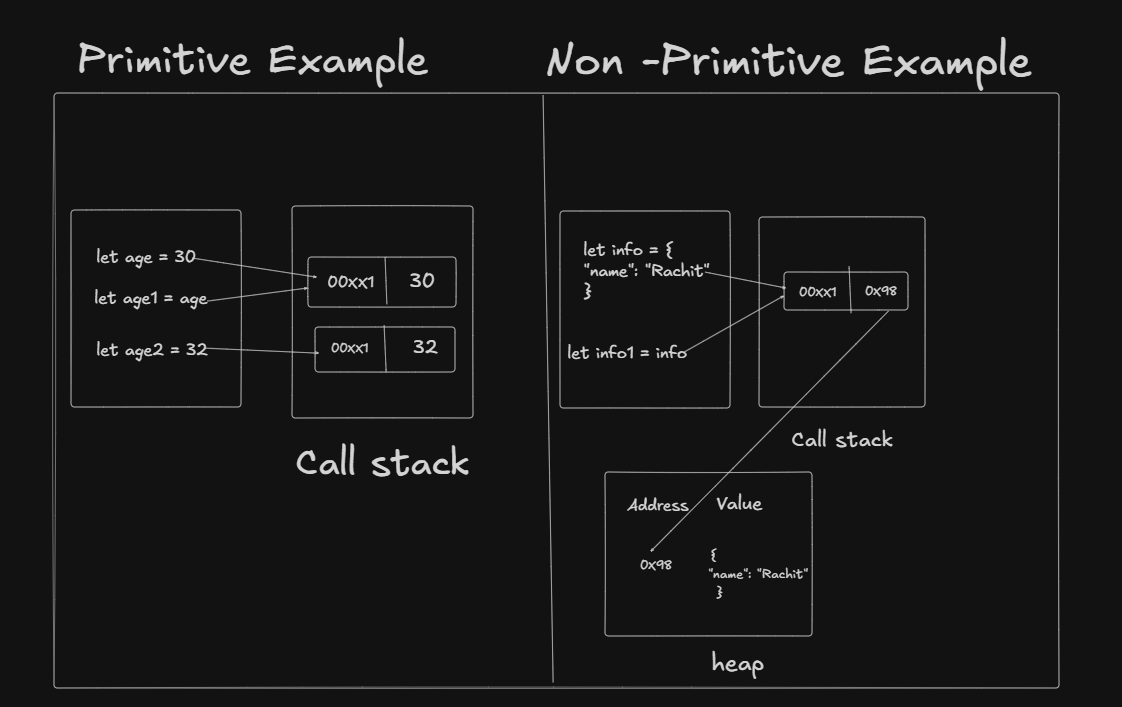
The Catch: For these, the box doesn't hold the actual heavy appliances—it holds a Piece of Paper (a Reference) telling the computer exactly where that heavy crate is stored in the warehouse.
The "Neighborhood" (Scope)
Now that you have your boxes and your stuff, where you put them matters. In JavaScript, this is called Scope.
Global Scope (The Sidewalk)
If you put a box on the sidewalk outside your new house, anyone in the neighborhood can see it and change what’s inside. In code, a variable declared outside of any function or block is "Global."
Local/Block Scope (The Bedroom)
If you put a box inside a specific room and close the door, only the people inside that room can use it.
Modern Boxes (
letandconst): These respect the "doors" (the curly braces{ }). They stay where they are put.The "Leaky" Antique (
var):vardoesn't always respect the doors. It can "leak" out of a room and end up in the hallway where it wasn't supposed to be! This is whyvarcauses bugs.
Try It Yourself
Now that you’ve learned the theory, let’s get your hands dirty. Open your browser's console (Right-click > Inspect > Console) and try to run these experiments.
Experiment 1: The Locked Vault
Copy and paste this code:
const birthYear = 1995;
console.log(birthYear);

// Now try to change it
birthYear = 2000;
What happens? You should see a red error: Uncaught TypeError: Assignment to constant variable. This proves that const is a locked vault!
Experiment 2: The Tupperware Swap
Try this:
let currentCity = "New York";
console.log("Starting in: " + currentCity);

currentCity = "London";
console.log("Moved to: " + currentCity);
What happens? No error! let allows you to take the old value out and put a new one in.
Experiment 3: The Secret Room (Scope)
This one is tricky. Try to run this:
{
  let hiddenBox = "Gold Coins";
  var publicBox = "Old Newspapers";
}

console.log(publicBox); // Works!
console.log(hiddenBox); // Error!
What happens? You can see the var (it leaked out of the room!), but hiddenBox is invisible because it’s a let variable trapped inside the curly braces.
Common Mistakes (The "Oops" Section)
Naming your boxes with numbers: You can't start a variable name with a number (e.g.,
let 1stPlace = "Alex";is a no-go).Forgetting quotes on Strings: If you write
let name = Alex;without quotes, JavaScript thinksAlexis another box, not the text "Alex".Mixing up
=and==: Remember, one=is the "action" of putting something in a box. Two==is for comparing if two boxes are the same.
Bonus: The Common "Interview" questions
1. "What is Hoisting, and how does it differ between var, let, and const?"
The "Under the Hood" Explanation: JavaScript moves variable declarations to the top of their scope during the compilation phase.
The
varbehavior: The "Antique" box is hoisted and initialized asundefined. You can actually use it before the line where you wrote it without the code crashing (though it will be empty).The
let/constbehavior: These are hoisted but not initialized. They stay in the "Temporal Dead Zone" (TDZ). If you try to use them before their line, the code crashes.
Analogy: var is like a ghost that appears in the house before the moving truck arrives. let and const are like furniture that doesn't exist until the truck actually parks and unloads.
2. "Why are Arrays and Functions considered Objects?"
The "Under the Hood" Explanation: In JavaScript, there are Primitives and Objects. Everything that isn't a Primitive is an Object. Arrays and Functions are "Specialized Objects."
Arrays are objects where the "labels" are numbers (indexes: 0, 1, 2).
Functions are "Callable Objects." They have properties and methods just like objects, but you can also execute them.
Analogy: An Object is a big crate. An Array is just that same crate but with built-in dividers and numbered slots.
3. "What is the difference between null and undefined?"
The "Under the Hood" Explanation: * undefined: The variable has been declared, but no value has been assigned yet. It is the default state.
null: This is an assignment value. It is used by the programmer to explicitly say "this box is empty."
Analogy: undefined is a box you haven't opened yet, so you don't know what's inside. null is a box you’ve opened, emptied out, and labeled "This box is intentionally empty."
4. "Explain 'Pass by Value' vs. 'Pass by Reference'."
The "Under the Hood" Explanation: * Primitives are passed by value. If you copy a string box, you get a second, identical string. Changing one doesn't hurt the other.
- Objects are passed by reference. If you copy an object box, you aren't copying the stuff—you are copying the map/key to the same crate.
Analogy: * Value: Giving a friend a photocopy of your book. They can scribble on theirs, and yours stays clean.
- Reference: Giving a friend the spare key to your house. If they go in and paint the walls red, your house is now red too!
Summary: Moving Day Recap
Understanding JavaScript variables is all about knowing what you’re storing and where you’re putting it. Here’s the final inventory:
1. Choose Your Box (Keywords)
const(The Vault): Your default choice. Use it for values that never change.let(The Tupperware): Use it for values that need to be updated.var(The Antique): Avoid it! It’s "leaky" and behaves unpredictably due to hoisting.
2. Know Your Stuff (Data Types)
Primitives: Simple items like Strings (text), Numbers, and Booleans (true/false). These are stored directly in the box.
Reference Types: Complex items like Objects, Arrays, and Functions. The box doesn't hold the stuff; it holds a "map" or "receipt" (reference) to where the stuff lives in memory.
3. Mind the Neighborhood (Scope)
Global Scope: Boxes left on the "sidewalk" (outside functions/blocks) that everyone can see.
Block Scope: Boxes kept inside "rooms" (curly braces
{}).letandconstrespect these walls, whilevartends to leak out.
Final Pro-Tip
When in doubt, always use const. If you find out later that the value needs to change, swap it to let. This keeps your code clean, predictable, and bug-free!


