Understanding Operators in JavaScript: The Building Blocks of Logic

If you've ever typed a sum into a calculator or sorted items in a list, you've used operators! In JavaScript, operators are special symbols or keywords that tell the interpreter to perform a specific action, whether it's a mathematical calculation, a comparison between values, or a logical decision. They are the fundamental tools that allow us to manipulate data and create dynamic programs.
How to Run the Code in This Blog
You don't need to install any special software! You can run JavaScript right inside your browser (Chrome, Firefox, or Edge) using the Console.
Open the Console:
Windows/Linux: Press
Ctrl+Shift+JMac: Press
Cmd+Option+J
Enable Pasting (First time only): If the console doesn't let you paste, type
allow pastingand hit Enter. This is a safety feature to make sure you know what you're doing!Type or Paste: Copy any code snippet from this blog.
Press Enter: Watch the result appear instantly!
1. Arithmetic Operators: Your Basic Math Toolkit
These are probably the most intuitive operators, as they perform common mathematical calculations.
Addition (+): Adds two numbers.
let sum = 10 + 5; // sum is 15
console.log(sum);
Subtraction (-): Subtracts one number from another.
let difference = 20 - 7; // difference is 13
console.log(difference);
Multiplication (*): Multiplies two numbers.
let product = 6 * 4; // product is 24
console.log(product);
Division (/): Divides one number by another.
let quotient = 15 / 3; // quotient is 5
console.log(quotient);
Modulus (%): Returns the remainder of a division. This is super useful for checking if a number is even or odd, or for cyclic operations.
let remainder = 10 % 3; // remainder is 1 (10 divided by 3 is 3 with 1 left over)
console.log(remainder);

let isEven = 4 % 2; // isEven is 0 (no remainder)
console.log(isEven);
Let's perform some arithmetic operations on two numbers:
let num1 = 25;
let num2 = 7;

console.log("num1 + num2 =", num1 + num2); // Output: 32
console.log("num1 - num2 =", num1 - num2); // Output: 18
console.log("num1 * num2 =", num1 * num2); // Output: 175
console.log("num1 / num2 =", num1 / num2); // Output: 3.57...
console.log("num1 % num2 =", num1 % num2); // Output: 4
2. Comparison Operators: Making Decisions
Comparison operators are used to compare two values and return a Boolean result (true or false). They are crucial for controlling the flow of your program, allowing it to make decisions.
Equal To (==): Checks if two values are equal, performing type coercion if necessary (meaning it tries to convert types to match before comparing).
console.log(5 == 5);     // true
console.log(5 == "5");   // true (JavaScript converts "5" to a number)
console.log(0 == false); // true
Strict Equal To (===): Checks if two values are equal and if they are of the same data type. No type coercion is performed. This is generally the preferred comparison operator as it avoids unexpected results.
console.log(5 === 5);     // true
console.log(5 === "5");   // false (different types: number vs string)
console.log(0 === false); // false (different types: number vs boolean)
Not Equal To (!=): Checks if two values are not equal, with type coercion.
console.log(10 != 5);    // true
console.log(10 != "10"); // false (because 10 == "10" is true)
Greater Than (>): Checks if the left operand is greater than the right operand.
console.log(10 > 5);   // true
console.log(5 > 10);   // false
Less Than (<): Checks if the left operand is less than the right operand.
console.log(5 < 10);   // true
console.log(10 < 5);   // false
Greater Than or Equal To (>=): Checks if the left operand is greater than or equal to the right.
console.log(10 >= 10); // true
console.log(10 >= 5);  // true
Less Than or Equal To (<=): Checks if the left operand is less than or equal to the right.
console.log(5 <= 10);  // true
console.log(10 <= 10); // true
Compare two values using both == and ===:
let value1 = 10;
let value2 = "10";
let value3 = 10;

console.log("value1 == value2:", value1 == value2);     // Output: true
console.log("value1 === value2:", value1 === value2);   // Output: false (different types)
console.log("value1 == value3:", value1 == value3);     // Output: true
console.log("value1 === value3:", value1 === value3);   // Output: true
3. Logical Operators: Combining Conditions
Logical operators allow you to combine multiple Boolean expressions (true/false values) to create more complex conditions.
Logical AND (&&): Returns true if both operands are true. Otherwise, it returns false.
console.log(true && true);   // true
console.log(true && false);  // false
console.log((10 > 5) && (20 < 30)); // true (both are true)
Logical OR (||): Returns true if at least one of the operands is true. It only returns false if both operands are false.
console.log(true || false);  // true
console.log(false || false); // false
console.log((10 > 5) || (20 > 30)); // true (first part is true)
Logical NOT (!): Inverts the Boolean value of its operand. If something is true, ! makes it false, and vice-versa.
console.log(!true);  // false
console.log(!false); // true
console.log(!(10 > 5)); // false (because 10 > 5 is true)
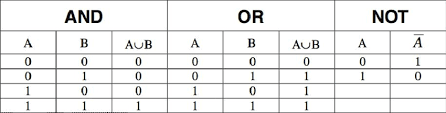
Write a small condition using logical operators
let age = 25;
let hasLicense = true;

// Check if a person is old enough to drive AND has a license
let canDrive = (age >= 18) && hasLicense;
console.log("Can drive:", canDrive); // Output: true

let isWeekend = false;
let isHoliday = true;

// Check if it's the weekend OR a holiday (time to relax!)
let freeTime = isWeekend || isHoliday;
console.log("Free time:", freeTime); // Output: true

let isLoggedIn = false;
// Check if a user is NOT logged in
console.log("Not logged in:", !isLoggedIn); // Output: true
4. Assignment Operators: Storing and Updating Values
Assignment operators are used to assign values to variables. The most basic is the single equals sign (=).
Assignment (=): Assigns the value of the right operand to the left operand (the variable).
let x = 10; // x now holds the value 10
let message = "Hello"; // message now holds the string "Hello"
Add and Assign (+=): Adds the right operand to the left operand and assigns the result to the left operand. It's a shorthand for x = x + y;.
let score = 100;
score += 50; // Same as: score = score + 50; // score is now 150
console.log(score);
Subtract and Assign (-=): Subtracts the right operand from the left and assigns the result. Shorthand for x = x - y;.
let health = 100;
health -= 20; // Same as: health = health - 20; // health is now 80
console.log(health);
Multiply and Assign (*=): Multiplies the left operand by the right and assigns the result. Shorthand for x = x * y;.
let price = 10;
price *= 2; // Same as: price = price * 2; // price is now 20
console.log(price);
Divide and Assign (/=): Divides the left operand by the right and assigns the result. Shorthand for x = x / y;.
let total = 50;
total /= 5; // Same as: total = total / 5; // total is now 10
console.log(total);
Modulus and Assign (%=): Performs the modulus operation and assigns the remainder. Shorthand for x = x % y;.
let count = 10;
count %= 3; // Same as: count = count % 3; // count is now 1
console.log(count);


